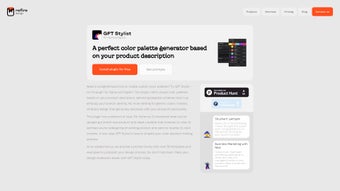

Download GPT Stylist – AI Color Palette Generator for Figma & FigJam
Overview
GPT Stylist is a cutting‑edge AI plugin designed exclusively for Figma and FigJam, aimed at simplifying the often‑time‑consuming task of color selection. By leveraging OpenAI’s language model, the tool can instantly generate custom color palettes that align with a brand’s visual language, project goals, or even a specific mood board. Whether you’re a solo freelancer launching a brand identity, a design agency juggling multiple client projects, or a product team refining a UI kit, GPT Stylist offers a fast, secure, and fully integrated solution that lives inside your favorite design environment.
The plugin does more than just spit out random hues. It analyses the textual prompts you provide—such as “modern fintech with a trustworthy feel” or “playful children’s app with pastel tones”—and returns a curated set of primary, secondary, and accent colors that are ready to be dragged directly onto your canvas. In addition, GPT Stylist ships with a growing prompt library, giving you pre‑written templates for common design scenarios, saving you both brainstorming and research time. While the plugin requires an internet connection to access the AI model, its lightweight footprint ensures it won’t slow down your Figma workspace.
From a workflow perspective, GPT Stylist integrates seamlessly with Figma’s native components. Generated palettes appear as editable color styles, which means you can instantly apply them to existing layers, components, or text elements. The tool also supports live updates: if you tweak a prompt, the palette refreshes in real time, allowing rapid iteration without leaving the design file. Overall, GPT Stylist positions itself as the go‑to AI‑powered color assistant for designers who value speed, consistency, and brand alignment.
Beyond the core generation engine, the plugin includes a secure cloud‑processing layer that encrypts every API call, ensuring that proprietary brand data never leaves your workspace. Regular automatic updates keep the AI model current with the latest design trends, and a built‑in changelog notifies users of new features such as expanded industry‑specific prompt sets. Whether you’re downloading the tool for free or opting into a paid tier for unlimited generations, GPT Stylist balances accessibility with enterprise‑grade security, making it a reliable addition to any design toolbox.
Key Features & Benefits
- AI‑Driven Palette Generation: Uses GPT‑4 to interpret natural‑language prompts and deliver cohesive color sets that match brand personality.
- Prompt Library: Over 50 pre‑crafted templates covering industries, moods, and design trends, enabling quick start‑ups for any project.
- One‑Click Style Creation: Generated colors are automatically saved as Figma color styles, ready for immediate application.
- Real‑Time Updates: Modify a prompt and watch the palette adjust instantly, facilitating rapid design iterations.
- Brand Consistency Tools: Ability to upload existing brand guidelines (hex codes, logos) so the AI can produce complementary shades.
- Collaboration Ready: Works in FigJam, allowing teams to brainstorm color concepts together during workshops.
- Secure Cloud Processing: All AI calls are encrypted; no local data is stored, ensuring client confidentiality.
- Lightweight & Fast: Minimal impact on Figma performance, even on large design files.
These features translate into tangible benefits for designers. First, the time saved on manual color research can be redirected toward higher‑level creative tasks, such as layout refinement or user testing. Second, the consistency built into AI‑generated palettes reduces the risk of brand drift, a common issue when multiple designers work on the same product. Third, the prompt library serves as an educational resource; junior designers can learn industry‑specific color theory simply by exploring the ready‑made suggestions.
Another advantage is the plugin’s adaptability. Because it operates on text prompts, you can experiment with abstract concepts—like “energetic yet calming”—and receive palettes that might not emerge from traditional rule‑based generators. This opens up creative possibilities while still anchoring the output to data‑driven aesthetics. Finally, GPT Stylist’s integration with FigJam means design sprints and remote workshops can include color brainstorming as a fluid part of the process, fostering a more collaborative atmosphere.
For teams that need governance, the tool includes audit logs that record who generated which palette and when, helping maintain a clear design provenance. The free tier provides up to ten generations per month, while the premium subscription unlocks unlimited usage, advanced export formats (such as CSS variables and Sketch files), and priority support. By delivering a balanced mix of AI power, usability, and enterprise controls, GPT Stylist becomes more than a simple color tool—it evolves into a strategic asset for any design‑focused software workflow.
Installation & Usage Instructions
Getting started with GPT Stylist is straightforward. Follow these steps to download, install, and make the most of the plugin:
- Download the Plugin: Open Figma, navigate to the Community tab, and search for “GPT Stylist”. Click Install. The process takes less than a minute.
- Authorize Access: Upon first launch, you’ll be prompted to log in with your OpenAI API key. This key is required for secure communication with the AI model. If you don’t have one, the plugin guides you to create a free account.
- Open the Plugin Panel: With any Figma file open, go to Plugins > GPT Stylist. The side panel appears, showing the prompt input box, a library dropdown, and a “Generate Palette” button.
- Enter a Prompt: Type a description of the desired mood, brand, or project (e.g., “vintage coffee shop with warm earthy tones”). You can also select a pre‑written prompt from the library.
- Generate & Apply: Click Generate Palette. Within seconds, a set of 5–7 colors appears. Hover over each swatch to see the hex code and click Add to Styles to create Figma color styles automatically.
- Iterate: If the palette isn’t perfect, adjust the prompt—add adjectives, reference a competitor’s brand, or specify a dominant hue—and press Regenerate. The updated colors replace the previous set instantly.
- Export (Optional): For documentation, click Export Palette to download a JSON file containing the hex values and descriptive metadata.
Because GPT Stylist runs as a cloud‑based service, a stable internet connection is required during generation. However, once colors are saved as styles, they remain usable offline, allowing you to continue designing even without connectivity. The plugin also respects Figma’s permission settings; it only accesses the file you have open, ensuring privacy and security.
Advanced users can integrate the exported JSON into other design tools—such as Sketch, Adobe XD, or even front‑end code bases—by mapping the hex values to CSS variables or design tokens. This flexibility makes the plugin a bridge between UI design and development, turning a simple download into a long‑term asset for cross‑functional teams.
Compatibility & System Requirements
GPT Stylist is built for the web‑based Figma environment and therefore works on any operating system that can run a modern browser—Windows 10/11, macOS 12+, Linux distributions, as well as Chrome OS. There is no native desktop installer; the plugin lives inside Figma’s cloud platform, which guarantees automatic updates and eliminates the need for manual version management.
While the plugin itself is lightweight, optimal performance is achieved with the following specifications:
- Browser: Latest versions of Chrome, Edge, Safari, or Firefox.
- Internet: Minimum 5 Mbps download speed for quick AI response times.
- Memory: At least 4 GB RAM; larger design files benefit from 8 GB+
- CPU: Modern multi‑core processor (Intel i5/Ryzen 5 or newer) for smooth UI interactions.
Because GPT Stylist is a plugin, it does not run on mobile Figma apps. Designers working primarily on iOS or Android devices will need to switch to the desktop or web version for full functionality. The plugin also respects corporate firewalls; if your organization blocks external API calls, you may need to whitelist api.openai.com to allow communication.
In terms of version compatibility, GPT Stylist is continuously updated to align with Figma’s API changes. Users receive update notifications within the plugin panel, and the update process is automatic—no manual download required. This ensures that the tool remains secure, performant, and compatible with the latest Figma releases, while also delivering new features such as expanded prompt categories and improved export options without additional effort from the user.
Pros, Cons, FAQ & Final Verdict
Pros
- Instant AI‑generated palettes that match brand personality.
- Extensive prompt library speeds up creative brainstorming.
- One‑click creation of Figma color styles eliminates manual entry.
- Real‑time updates enable rapid iteration.
- Secure cloud processing with encrypted API calls.
- Free tier available for occasional users; paid tier adds unlimited generations.
- Audit logs and export options support enterprise workflows.
Cons
- Requires an internet connection; no offline generation.
- Limited customization beyond prompt tweaking (e.g., no direct hue sliders).
- Only available within Figma/FigJam; no standalone app for other design tools.
- Advanced features locked behind a subscription, which may deter hobbyists.
Frequently Asked Questions
Do I need an OpenAI account to use GPT Stylist?
Yes. The plugin requires an OpenAI API key for secure communication with the AI model. You can obtain a free key during the onboarding process directly from the plugin.
Can I export the generated palettes for use outside Figma?
Absolutely. GPT Stylist includes an “Export Palette” button that downloads a JSON file containing hex values and descriptive metadata, which you can import into other design tools.
Is the plugin free or does it require a subscription?
The core functionality is free. Advanced features such as unlimited prompt generations and premium prompt libraries are available via a modest monthly subscription.
How does GPT Stylist ensure brand consistency?
You can upload existing brand colors or logos, and the AI will generate complementary palettes that respect the original palette’s hue, saturation, and mood, helping maintain visual coherence across projects.
Will GPT Stylist work with large Figma files containing many components?
Yes. Because the plugin only interacts with color data and not the entire file structure, performance remains smooth even in complex projects.
Conclusion & Call to Action
GPT Stylist fills a clear niche in the design workflow by marrying AI creativity with the practical demands of brand‑centric color selection. Its seamless integration with Figma and FigJam, combined with a robust prompt library and real‑time palette updates, makes it a valuable ally for designers seeking speed without sacrificing visual fidelity. While the reliance on an internet connection and the lack of granular manual controls might be drawbacks for power users, the overall value proposition—especially for teams that prioritize consistency and collaboration—remains compelling.
If you’re ready to accelerate your color‑decision process and keep your brand identity sharp, simply head to the Figma Community, install GPT Stylist, and start generating palettes in seconds. Unlock a new level of efficiency, reduce repetitive tasks, and let AI handle the heavy lifting while you focus on crafting exceptional user experiences.
Overall Rating: 4.5/5



.png)



